Documentation Index
Fetch the complete documentation index at: https://docs.notifuse.com/llms.txt
Use this file to discover all available pages before exploring further.
Overview
Custom events track user actions from external systems (e-commerce, CRM, analytics). They appear in the contact timeline and enable goal-based segmentation for building RFM (Recency, Frequency, Monetary) segments.
Every custom event creates an entry in the contact timeline, giving you a complete history of user interactions:
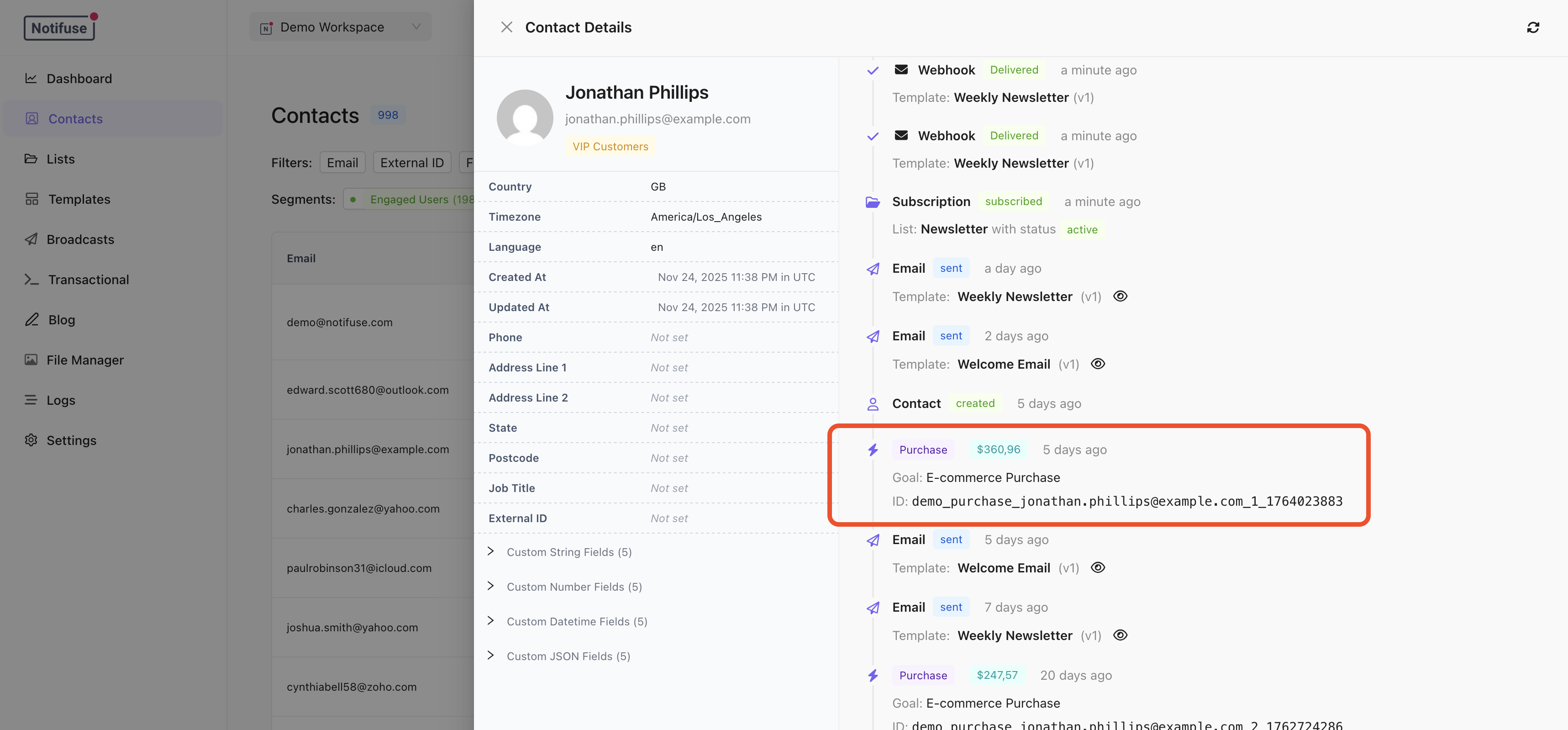 Events display with their
 event_name as the timeline entry type (e.g., “order.completed”, “subscription.started”). The properties field stores additional context visible in the timeline details.
Goal Types
Goals are the key to building powerful segments. Each event can optionally track a goal:
| Type | Use Case | goal_value |
|---|
purchase | E-commerce orders, one-time payments | Required |
subscription | SaaS subscriptions, memberships | Required |
lead | Contact forms, demo requests | Optional |
signup | Account registrations | Optional |
booking | Appointments, consultations | Optional |
trial | Free trial activations | Optional |
other | Custom conversion events | Optional |
Building RFM Segments
RFM (Recency, Frequency, Monetary) analysis identifies your best customers. Use the segment builder with “Custom Events Goals” conditions:
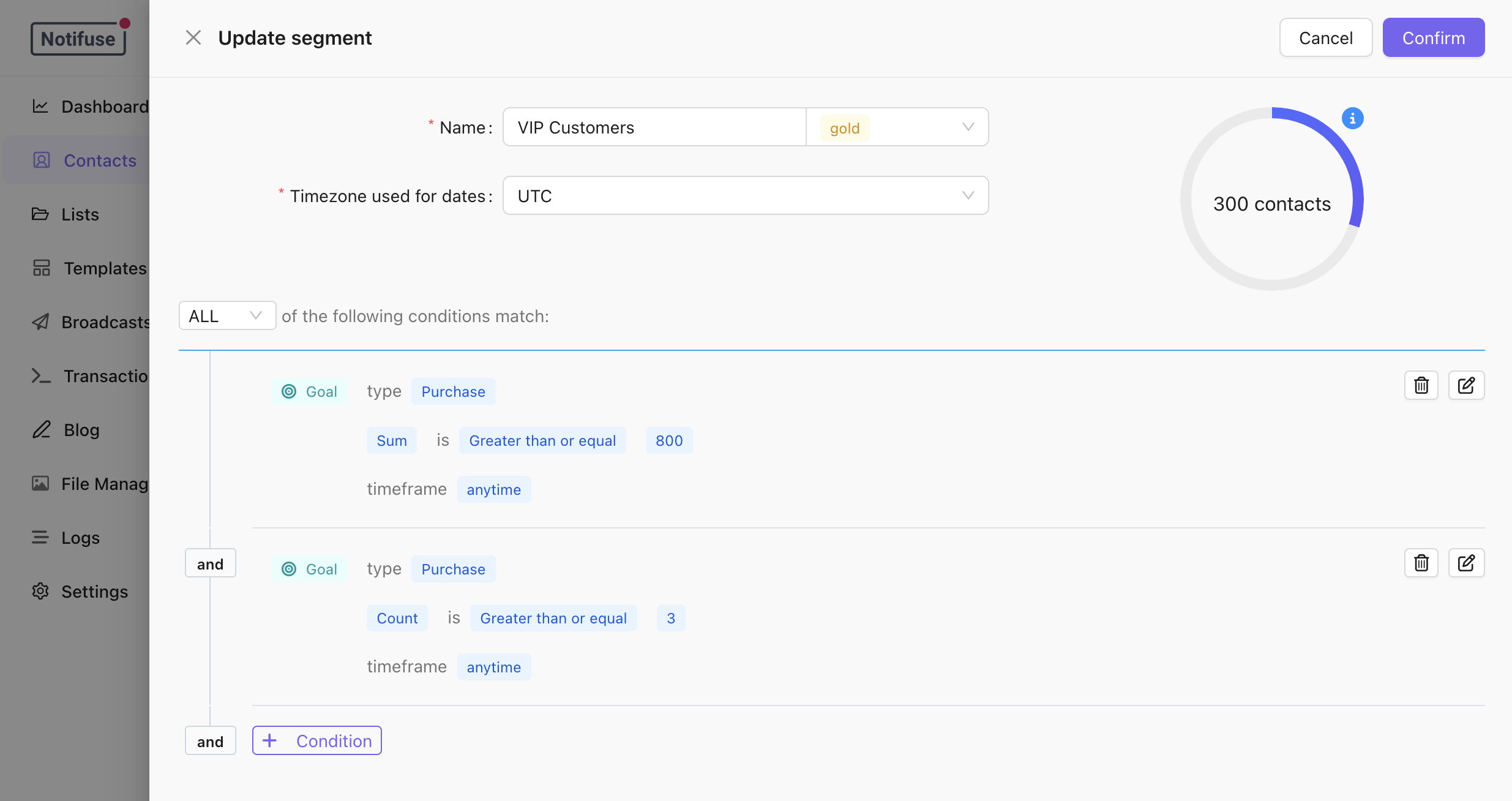
Monetary: Total Spend
Select goal type “purchase”, aggregate “sum”, and set a minimum value to find high-spending customers.
Frequency: Purchase Count
Select goal type “purchase”, aggregate “count”, and set a minimum number to find repeat buyers.
Recency: Recent Activity
Use the timeframe filter “in the last X days” to find customers with recent purchases.
Example RFM Segments
- VIP Customers: Spent $1000+ AND 5+ orders AND purchased in last 60 days
- At-Risk High-Value: Spent $500+ AND no purchase in 90 days
- New High-Potential: First purchase over $200 in last 30 days
Aggregate Options
| Option | Description |
|---|
| Sum | Total of all goal values (lifetime spend) |
| Count | Number of events (order count) |
| Average | Average goal value (AOV) |
| Min | Smallest goal value |
| Max | Largest goal value |
Timeframe Options
| Option | Description |
|---|
| Anytime | All historical data |
| In the last X days | Rolling window |
| In date range | Specific period |
| Before date | Historical cutoff |
| After date | Since a specific date |
Tracking Events
Single Event
curl -X POST "https://your-instance.com/api/customEvents.upsert" \
  -H "Authorization: Bearer YOUR_API_KEY" \
  -H "Content-Type: application/json" \
  -d '{
    "workspace_id": "your_workspace",
    "email": "customer@example.com",
    "event_name": "order.completed",
    "external_id": "order_12345",
    "properties": {
      "items": ["Product A", "Product B"],
      "currency": "USD"
    },
    "goal_type": "purchase",
    "goal_value": 149.99
  }'
Batch Import
Import up to 50 events at once:
curl -X POST "https://your-instance.com/api/customEvents.import" \
  -H "Authorization: Bearer YOUR_API_KEY" \
  -H "Content-Type: application/json" \
  -d '{
    "workspace_id": "your_workspace",
    "events": [
      {
        "email": "user1@example.com",
        "event_name": "order.completed",
        "external_id": "order_001",
        "goal_type": "purchase",
        "goal_value": 99.99
      },
      {
        "email": "user2@example.com",
        "event_name": "order.completed",
        "external_id": "order_002",
        "goal_type": "purchase",
        "goal_value": 249.99
      }
    ]
  }'
order.completedsubscription/startedform_submituser-signup
Handling Refunds
Use negative goal_value for refunds to keep accurate LTV calculations:
{
  "email": "customer@example.com",
  "event_name": "order.refunded",
  "external_id": "refund_12345",
  "goal_type": "purchase",
  "goal_value": -50.00
}
Notes
- Contacts are auto-created if they don’t exist
- Events update only if
occurred_at is newer than existing
- Soft-delete by setting
deleted_at (set to null to restore)
- See API Reference for complete endpoint documentation